01
Stored on the customer's phone
Customers keep the card on their phone, so it cannot be lost or left at home, and their stamps are always available.

 English
USD
English
USD
 България
EUR
България
EUR
 Türkiye
TRY
Türkiye
TRY
 Қазақстан
KZT
Казахстан · Русский
KZT
Қазақстан
KZT
Казахстан · Русский
KZT
 საქართველო
GEL
Georgia · English
GEL
Грузия · Русский
GEL
საქართველო
GEL
Georgia · English
GEL
Грузия · Русский
GEL
 Oʻzbekiston
USD
Узбекистан · Русский
USD
Oʻzbekiston
USD
Узбекистан · Русский
USD
 Кыргызстан
KGS
Кыргызстан
KGS
 Srbija
RSD
Srbija
RSD
 Crna Gora
EUR
Crna Gora
EUR
 Shqipëria
ALL
Shqipëria
ALL
 Moldova
MDL
Moldova
MDL
 Azərbaycan
AZN
Азербайджан · Русский
AZN
Azərbaycan
AZN
Азербайджан · Русский
AZN
 Bosna i Hercegovina
BAM
Bosna i Hercegovina
BAM
 Kosova
EUR
Kosova
EUR
 Indonesia
IDR
Indonesia
IDR
 Philippines
PHP
Philippines
PHP
 Polska
PLN
Polska
PLN
 Česko
CZK
Česko
CZK
 België
EUR
Belgique · Français
EUR
Belgium · English
EUR
België
EUR
Belgique · Français
EUR
Belgium · English
EUR
 Nederland
EUR
Netherlands · English
EUR
Nederland
EUR
Netherlands · English
EUR
 Luxembourg
EUR
Luxembourg · English
EUR
Luxembourg
EUR
Luxembourg · English
EUR
 Magyarország
HUF
Magyarország
HUF
 España
EUR
España
EUR
 Lietuva
EUR
Lietuva
EUR
 Latvija
EUR
Latvija
EUR
 Eesti
EUR
Eesti
EUR
Loyalty card · Cafés and coffee shops
Replace the paper card with a digital one in your colours and with your logo. Customers add it to their phone with one scan, and your barista adds stamps by scanning at the till, from 49 € a month per location.
14 days freeNo card requiredNo hardware, just a phone
This is the working stamp card and till screen. Change the colours, add a stamp and redeem the reward.
This is the working stamp card and till screen. Change the colours, add a stamp and redeem the reward.
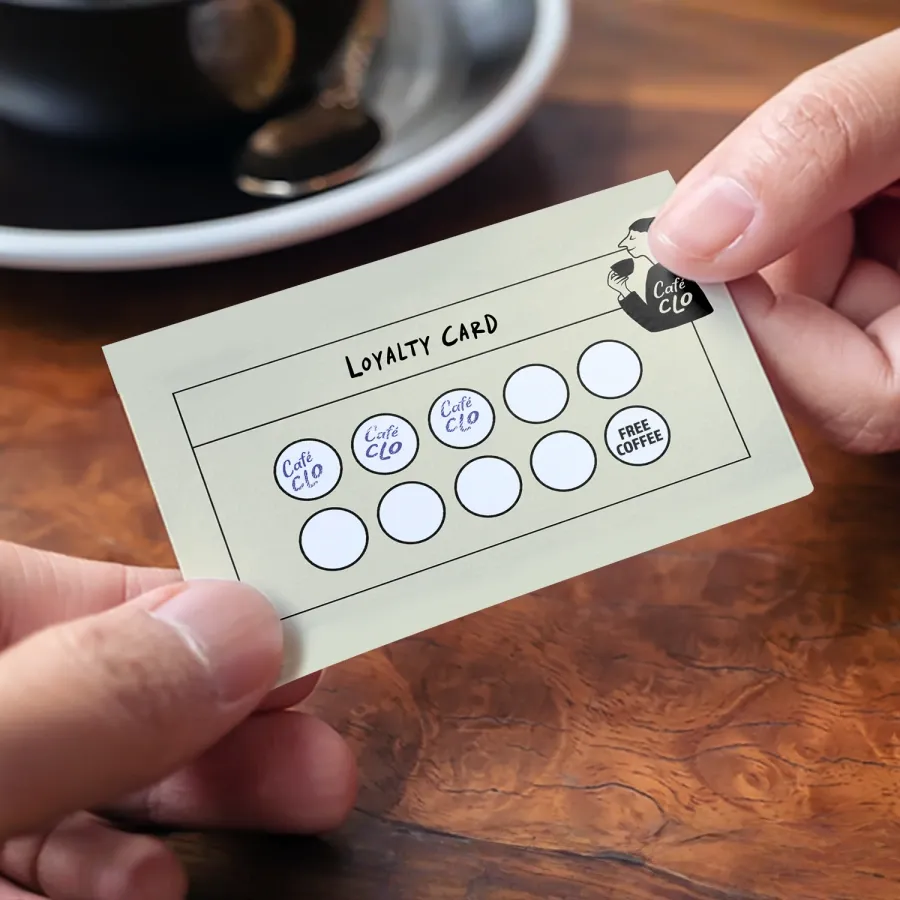
A café loyalty app puts a digital stamp card on the customer's phone instead of a paper card in their wallet. The customer shows a QR code at the till, your barista scans it from the dashboard on any phone, and a stamp is added; after a set number of coffees the reward unlocks. With TapTime you design the card in your colours without building an app.
Paper cards get lost, can be stamped without a purchase, and give you no information about who your regular customers are.
When a customer loses a card a few stamps before a reward, they have to start again, and many stop collecting.
A pen or rubber stamp is easy to imitate, so you cannot be sure how many rewards were genuinely earned.
Paper cards cannot tell you how many customers are collecting, who has stopped visiting or how many rewards you gave last month.
Design the card once, share it with a QR code and add stamps with a scan. Each problem above is addressed in the dashboard.
Customers keep the card on their phone, so it cannot be lost or left at home, and their stamps are always available.
The customer shows their QR code, your barista scans it from the dashboard on any phone and taps Add a stamp. Each stamp is logged with the time and location.
Stamp and reward statistics per location show how many customers are collecting, how many are one stamp from a reward and how many rewards were redeemed this month.
The card designer supports colours or a gradient, your logo, stamp and reward icons, and fonts, so the card matches your brand.
Nine stamps by default, or any number you choose. Offer a free coffee, a pastry or a bag of beans, with a description, terms and an optional expiry.
The same card works at all your locations, staff are scoped to their own site, and statistics are combined in one dashboard.
No hardware, no onboarding call and no printing other than the QR code. Everything runs from the dashboard on a phone.
Choose the colours, upload your logo and select the stamp icon and reward, for example nine stamps for a free coffee.
Customers scan it once and the card is saved on their phone, with nothing to install. It sits alongside any other TapTime cards they have.
At the till, the customer shows their code, your barista scans it from the dashboard and taps Add a stamp. When the reward unlocks, tap Redeem.
| Paper stamp card compared with a digital card. | Paper stamp card | TapTime loyalty card |
|---|---|---|
| Where it is kept | In a wallet or pocket, easily lost | On the customer's phone |
| Adding a stamp | A pen or rubber stamp that is easy to copy | A scan at the till, logged with the time |
| Knowing your regular customers | Staff recognise familiar faces | Stamps and rewards counted in the dashboard |
| Changing the reward | Reprinting cards | Edit once, every card updates |
| Several locations | Separate cards, or no way to check | One card, valid at every location |
| Cost | Regular reprints and untracked rewards | 49 € a month per location |
Each stamp, new member and reward is an event you can send to other tools. This is included with the loyalty card at no extra cost: no add-on, no higher tier and no per-stamp fee.
How conversions, webhooks and the API work


A customer's first stamp is reported once as a sign-up: GA4 sign_up and Meta CompleteRegistration. This lets you measure campaigns by the number of members who joined, not only by reach.






Choose which events the team's Telegram group receives, such as a reward earned or redeemed, or a new member. Each arrives within seconds with the customer and time, without a message for every stamp.




Zapier, Make, n8n or Pipedream can add every stamp and redeemed reward to Google Sheets with the time and location, so you and your accountant can see how many rewards were given each month.


The REST API reads loyalty programs, cards and rewards, plus an event feed of every stamp. Signed webhooks send each event to your own reporting, from every location.
49 € a month per location. The card designer, the card on the customer's phone, scanning at the till, statistics, promo codes, gift cards and the refer-a-friend program are all included. No hardware to buy and no per-stamp fees.
One card works at every location, and each location has its own 49 € subscription managed from the same dashboard. Other TapTime modules, such as a QR menu, table reservations or appointments, are priced separately.
No. The card is kept on their phone. They scan your QR code once and the card is saved, with nothing to install. If they already use TapTime at another business, your card appears alongside the others.
The customer shows the QR code on their phone, and the barista scans it with the dashboard open on any phone and taps Add a stamp. No scanner, card reader or new hardware is needed at the till.
Yes. Nine is the default, and you can set any number, name the reward, write the terms and add an optional expiry. If you change it later, every card is updated.
The card belongs to the customer's TapTime account, not to the device. They sign in on the new phone and their stamps are still there.
No, there is no app to publish. The card carries your logo, colours, icons, fonts and reward, and that is what customers see on their phone after one scan. No developer is needed.
You can set colours or a gradient, your logo, the stamp and reward icons and the font, as well as the number of stamps, the reward title and description, the terms and an optional expiry.
49 € a month per location, paid monthly by card. No contract, no setup fee and no per-stamp charge. The first 14 days are free and no card is needed to start.
After a short grace period the card is paused and shows a brief “temporarily unavailable” note on the customer's phone. Nothing is deleted: cards, stamps and statistics are kept and restored when you reactivate the subscription.
Yes. Connect Zapier, Make, n8n or Pipedream under Integrations, press Send test and map the fields to a sheet. From then on TapTime sends every stamp, new member and reward as it happens, with the customer, time and location, and retries any delivery that fails.
Design your card, place the QR code at the till and start adding stamps the same day. Cancel at any time.
14 days free No card required Cancel anytime
Hello. Ask me anything about TapTime — what it does, what it costs, or how to set something up. I answer from our help center.
Answers come from our help center and can be wrong. For anything about your own account, write to us.